
What kind of memory does a PDA need?
A PDA is just another computer, except it is smaller than most other computers. And to really oversimplify things, a computer needs three things to work: A CPU to compute things, an input/output system to communicate with its user or environment, and some memory to store things. Before going into detail about what challenges early developers of PDAs faced with respect to memory, we should recap what types of memory there is. Let’s first talk about what types of uses there are of memory. A computer needs some sort of operating system that guides the operation of the device, translates the stream of data coming from a keyboard or digitizer, loads and run applications etc. This memory has to be persistent (be there even where the unit has no power), ready to be read from as soon as the device is started. We sometimes refer to this non-volatile memory as firmware. As a special case of firmware, we have the Basic Input/Output System or BIOS of a typical Personal Computer of the time.
Then we have the next type of memory that any computer needs. This is where all the action takes place, where applications are run from, where calculations are made, where text is input before it is committed to a file etc. We call this memory working memory.
Lastly we have the third kind of memory. It is where you, as a user, want to save the results of your work, be it a document, a spreadsheet, a piece of music or whatever. We call this type of memory persistent storage or just storage.
So to summarise, a PDA needs three kinds of memory:
- Firmware (to start and run the device)
- Working memory (where programs execute)
- Persistent storage (where user data is kept)
Now that we know what kinds of usage memory must have, let’s have a look at what technologies exist or existed, that can perform those tasks.
Firmware and non-volatile memory
To store an operating system, you would need a type of memory that doesn’t need a power-source to retain its contents. The first computers (the big ones manufactured in the 1950s and early 1960s) usually did not have hardware to perform this task, because that technology was yet to be invented. Instead they used paper-tape or stacks of punched cards to initialize the working memory of the computer and then run programs from there.
Mask-programmed ROM
But this could not be a solution for anything as small as a PDA. Instead, it would need some sort of solid-state memory, and the first type to be used was the Read Only Memory or ROM. The ROM was a circuit (or set of circuits) designed at time of manufacture to contain a certain content or set of instructions (that the CPU would understand). This type of ROM is sometimes referred to as a “mask-programmed ROM”. As the content was set at time of manufacture, it would not be possible to upgrade the operating system of a PDA using a mask-programmed ROM to store its operating system after the PDA has been assembled, unless that ROM was possible to replace physically with another ROM chip.
An example where this strategy actually was used was with the Ericsson MC12 (and its sister HP LX360) which offered a ROM-upgrade from Windows CE 1.0 to 2.0. But this way of upgrading was rather the exception to the rule. As the contents of the ROM had to be fixed at time of manufacture, it meant that the startup cost of producing one was high. So in order to be economically viable, the number of units produced had to be pretty high.
PROM and EPROM
The next step in the evolution of ROM’s was called EEROM as in Electrically Erasable Read Only Memory, and now we are getting close to the end goal – to enable the customer him/herself update the firmware of the PDA (thereby limiting the amount of quality control the PDA manufacturer would have to perform on the code, the sceptic would say). Some, but not all, EEROMs allowed the chip to be re-programmed without being removed from the computer, but this practice was still not common in the PDA market.
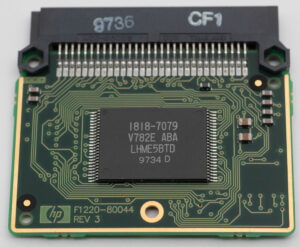
The ROM chip in the Ericsson MC12, an example of a mask-programmed ROM. It was easily replaced by one containing the newer Microsoft Windows CE 2.0 operating system.
Wouldn’t it be infinitely better if the ROM could be programmed after it had been manufactured? That way, an immense amount of chips could be manufactured in one go, and only later could it be decided whatever device it should go into and what code it should contain. That type of ROM called PROM as in Programmable Read Only Memory was invented after the first mask-programmable ROM. However, as far as the consumer was concerned, the content is still fixed once it has been programmed (which by the way was done by “burning fuses” inside the chip), so it brought no real benefit to the user, only to the manufacturer. The next step in this evolution was called EPROM or Erasable Programmable Read Only Memory. Hooray! Now we can erase the contents and re-program the chip. The erasing would be done by exposing the chip to ultraviolet light for a specified amount of time. But re-programming would still have to be made in special equipment, not in the computer itself, so it still would not allow the customer to upgrade an already purchased PDA.
EEPROM and Flash memory
So what would need to happen to really allow the end-user to update the firmware of his/her PDA? The invention of a completely new type of memory, called Flash memory. Flash memory would be memory that was mostly read, but sometimes written to, at least that was the case in the early days. When flash memory had been invented by Toshiba in the early 1980s, a new type of accessory also appeared – memory cards. One of the early form factors of memory cards was called Compact Flash and many of the PDAs in the collection presented on this site would be able to use one. Note however, that it was not until 1994 that CF cards made its way to the market (by SanDisk).
OK, but how about technology for the working memory then?
Working memory (RAM)
Unlike firmware, the characteristics of working memory is that it need not retain its contents when it is powered off. Instead it is more important that it is fast enough to be able to feed the CPU with instructions as fast as it can execute them. For this purpose a circuit called Random Access Memory or RAM was invented. The “random” part of the name suggests that it would take an equal amount of time to fetch data from the chip irrespective of where it was placed (as opposed to rotating memories such as spinning hard disks or drum drives), not that you would get any random data out of it 🙂 Basically the first RAM chips had transistors connected in a way that formed so called “flip-flops”, a circuit that can be in one of two states. Depending on the state of the flip-flop this is interpreted as either a “1” or a “0”. The RAM chip contained thousands of such flip-flops.
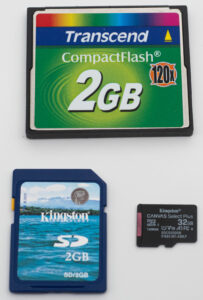
Three types of flash memory cards: On top, the oldest form factor called CompactFlash. Below, left, the slightly newer Secure Digital or SD Card. Below to the right, the micro SD card using the same interface as its bigger brother.
SRAM vs DRAM
The first type of RAM invented (the one with flip-flops) was “static” (SRAM), which meant that it retained its content as long as it was powered. You did not have to perform any procedure for it to remember its content. Static memory was very useful, but expensive, so engineers came up with a different kind of RAM called DRAM or dynamic random access memory. As DRAM did not use flip-flops to store the state of a bit, but rather a small capacitor, DRAM could store much more information given a specific chip-size and still cost the same amount of money to produce. Therefore DRAM was cheaper per bit than SRAM. However it had one drawback. Unless you used a specific procedure, it would lose its content in fractions of a second. This is because the small capacitor inside would leak its charge (discharge) to the environment. Doesn’t sound like good memory – does it? Well it turns out that if you used a procedure called “dynamic refresh” performed by specific controller-chips, the DRAM would keep its content for as long as needed. This could be performed by the DRAM controllers automatically in the background, so it was not a big drawback. Some CPU-types (notably the Z80) even took care of this functions inside the CPU. Problem solved!
Where did early PDAs store user data?
So where do you store the fruit of your labour with the PDA (your document, spreadsheet or whatever)? As with the firmware, it would have to be some place that is persistent. At the time of the early PDAs, the typical persistent storage for a PC would be the floppy (or a hard disk drive if you could afford it), but that would be entirely impractical on a PDA. And flash memory had not been invented yet, so what did manufactures of early PDAs offer? As it turned out, they offered one or more of the following solutions:
- Battery-backed system RAM: Your files are stored in the working memory of the PDA. The RAM is kept alive even when the rest of the PDA is shut down, so the contents is retained for as long as your batteries are good. Some PDAs had a specific backup-battery that kept the content of the RAM intact for at least long enough for you to be able to replace your run-out batteries. Or, as in the case with the Rolodex Rex for instance, it had two coin-cells connected in parallel so that you could replace one at a time, without depriving the PDA from power.
- Synchronisation with a desktop computer: PDAs relying on this strategy assumed that you had a Desktop computer (PC) and that you would synchronize your PDA with a PC that offers permanent storage every now and then. If you don’t your files will be gone when your batteries run out.
- Battery-backed up RAM cards: They would be of the SRAM variety as DRAM circuitry would draw too much power and, being a small device, you only had room for coin-cells to provide power to the RAM. Early memory-cards sometimes came in the form of PCMCIA-cards with sizes similar to a credit card.
- That’s it really, until flash memory was invented. When it was, many PDA’s offered a socket for a Compact Flash (CF) card and later the smaller SD Card. (Everyone except Sony of course, that for many years tried to push its own standard for flash cards called Memory Stick.)
Expansion and software distribution
What if you wanted to enhance your PDA with more applications that it originally came with? There were several ways to expand the software capabilities of a PDA:
- Syncing software with a PC: This was the more common way from the mid 1990s and onwards. You would then purchase or otherwise aquire the software on a diskette, put in your PC and then syncing it to your PDA
- ROM modules: This was more common in the very early days of handheld computing. By buying a ROM module specific to your PDA. That PDA would have a proprietary port for that ROM module. This was the case with the early Psion Organisers for instance, but also later PDAs, such as the Handspring Visor offered Springboard modules containing add-on software.
It should be said, however, that most of the time, users were satisfied with the software that came as standard with the PDA.