
The user-friendly PDA. The pen-based personal organiser that recognises your hand-writing
⚠️ Status: Not operational
This particular device is part of the collection but is currently in need of service. The description is based on available documentation and prior knowledge.
The text – and especially the photos – will be updated once the unit has been restored to working condition.
Quick facts
- CPU:
- Z8S180 (Z80-compatible) running at 14.3 MHz plus two Z8 for power management and character recognition
- RAM (KB):
- 128
- Storage (MB):
- PCMICA slot was used for memory expansion
- Display:
- 240×320 pixels, black and white touch-sensitive screen without backlight
- Operating system:
- Proprietary OS developed by Eden Group
- Year introduced:
- 1993
- Power source:
- 3 x AAA batteries + 1 x CR2032 for backup
- Connectivity:
- Serial port (RS232) for PC information interchange
- Dimensions (mm):
- 160×115×27
- Weight (g):
- 400
- Built-in apps:
- World clock, Diary, Tasks, Address book, Notes, Calculator, Conversion, Search
- Input method:
- Pen input with character recognition
Sales pitch from when it was new
Goodbye ring-binders, hello to the personal organizer for the next century! The Amstrad PenPad. Its sophisticated handwriting recognition facility means it “learns” to read your handwriting, so there’s no fiddly keyboard, you just “write” on the screen. It’s a diary, address book, calculator, jotting pad, conversion chart and much more all in one. It remembers birthdays, lets you draw sketches and maps – and never runs out of “paper”. In fact you need never buy a diary again. The PenPad is programmed to the year 2099 and beyond.
Overview
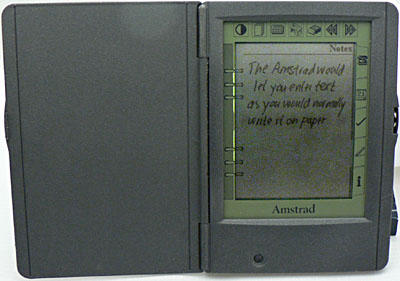
One of the first computers to recognize hand-writing, the Amstrad actually beat Apple with its Newton, to market by a few weeks. It is the first handheld computer to call itself a PDA. The PenPad is much larger than the PalmPilot. In fact it is more similar in size to a pocket book. It has a cover for the screen that is flipped away much similar to the way you would page into a book. There is a miniature serial connector at the top and a PCMCIA connector at the bottom. The pen is located in a slot at the back.
Handwriting recognition
The Amstrad Pen Pad was one of the first pen-based computers that could recognise handwriting. Characters were initially entered by the user when setting the PDA up for the first time in order to “teach” it that users hand-writing. In the applications, text was entered in the set of boxes provided. This is similar to filling in a paper-form that has one box for each letter. Obviously this method of input made it easier to recognise characters than the method that Apples Newton had choosen – continous flow handwriting recognition. Because the Amstrad presented several input character boxes at once, it made it slightly faster to input text than if you had only one fixed area of the screen, such as the Palm Pilot had.
Applications
Applications were the standard PIM ones with the addition of a unit conversion application. However, the Amstrad had one interesting feature: You could draw anything on the screen in the diary and notes applications and it would be saved as graphics on that page. Also of interest is the fact that it has a built-in speaker that could be used to dial numbers from the contacts application.
Communications
The PenPad had a serial (RS232) port that could connect to a PC for information interchange. Apparently, as Windows program called “Eden Windows Organizer” could be used to synchronise data between the PC and the PenPad. Other options also exist.
Expansion possibilites
The PenPad has a PCMCIA slot that can be used for memory cards only. When the PenPad was new, you could get these in sizes up to a whopping(!) 2 MB. Some companies shipped memory cards with preinstalled software, such as games.
Amstrad PenPal PDA600 was the first attempt to try to capture handwritten notes with a pen on a digital portable screen. It was a ambitious endeavour that in the end did not work out terribly well. Even the first batch manufactured would have to go on sale to get rid of the inventory.
Opinions
Cliff Lawson, PDA600 project manager, writes on his web site (link below):
The PDA600 is one of my favourite Amstrad projects which probably has something to do with the fact that I was the Project Manager! Unfortunately, The whole PDA concept was a bit of a plot that failed and as we were left with huge stocks of the PDA600 we have recently [c1996] sold them all to Tandy (Radio Shack). This does have the huge advantage that you can now buy one for GBP 50 (which is less than half what it cost us to build them!) … Interesting fact number 37 is that we got about 95% of the way through developing a replacement for thePDA600 called the PIC700 that included a radio pager but it ran hugely over budget and schedule and was eventually shelved … shame, it was brilliant.”
One of the users, Mark Stevenson, was less enthusiastic and writes on his page:
What can I say about the PDA600? This must be in my opinion the worst computer ever! It was supposed to be able to convert handwriting to text to allow quick and easy entries to be made, but it could never read my writing so I was forever going back to correct my mistakes.
The machine was also short on memory, it came as standard with 128kb. This could be filled with around 20 free form notes without any database entries being made at all. The database was completely uncustomisable, being suitable really only for a phone book. It also had a diary function which I don’t think was too bad – if you could ever get the entry in with the handwriting recognition.
References
Article written by the project manager of this PDA
Site in French with lots of technical details about this PDA (Tip: You can use Google to translate it if you don’t understand French)